Learn Touch Typing: Complete Beginner's Guide
Touch typing is the ability to type without looking at the keyboard, using all ten fingers with proper technique. This fundamental skill is the foundation for fast, accurate typing. Our complete beginner's guide will teach you everything you need to know to learn touch typing and build a strong typing foundation.
What is Touch Typing?
Touch typing is a typing method where each finger is assigned specific keys to type. By memorizing the keyboard layout and using proper finger placement, you can type without looking at the keys. This method dramatically increases typing speed and accuracy compared to hunt-and-peck typing.
Benefits of Touch Typing
- Increased Speed: Touch typists typically type 2-3 times faster than hunt-and-peck typists
- Better Accuracy: Proper technique reduces errors and improves overall accuracy
- Reduced Fatigue: Efficient finger movement prevents strain and repetitive stress injuries
- Improved Focus: Without looking at the keyboard, you can focus on your content
- Professional Advantage: Touch typing is a valuable skill in many professions
The Home Row: Foundation of Touch Typing
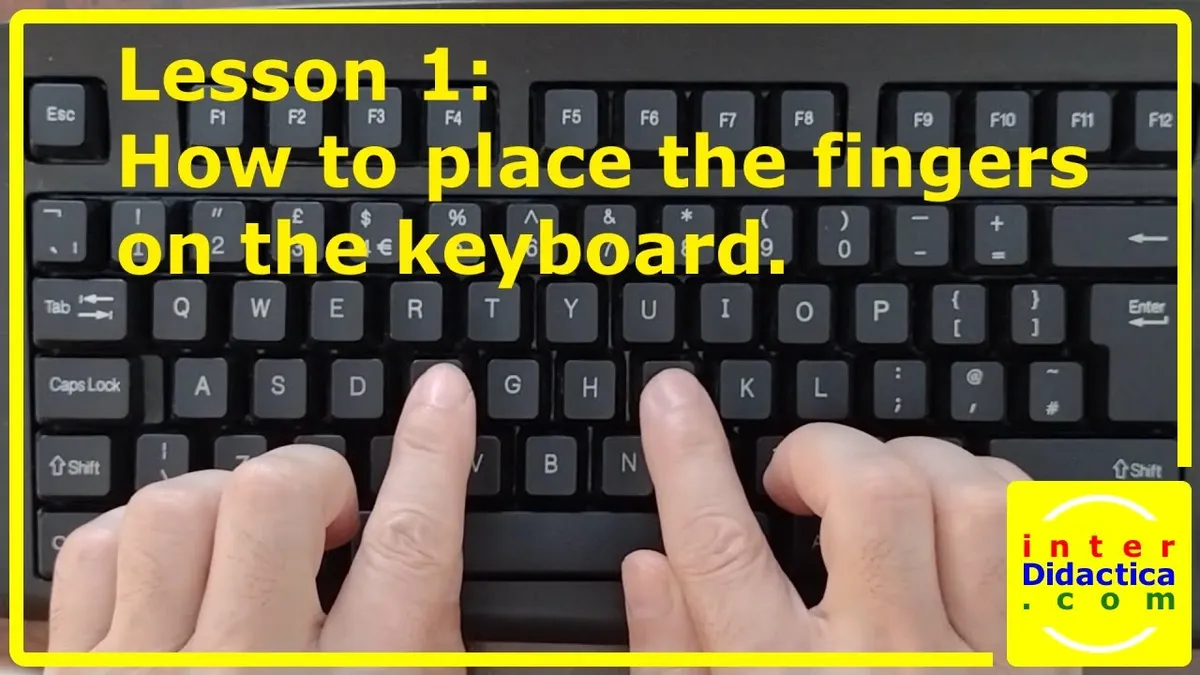
The home row is the starting position for all touch typing. Your fingers rest on specific keys, and all other keys are reached from this position.
Home Row Key Assignment
| Hand | Finger | Key | Reach |
|---|---|---|---|
| Left Hand | Pinky | A | Q, Z, 1 |
| Ring | S | W, X, 2 | |
| Middle | D | E, C, 3 | |
| Index | F | R, T, G, V, B, 4, 5 | |
| Right Hand | Index | J | U, Y, H, N, M, 6, 7 |
| Middle | K | I, Comma, 8 | |
| Ring | L | O, Period, 9 | |
| Pinky | ; | P, Slash, 0 |
Proper Posture and Hand Position
Sitting Position
Correct posture is essential for comfortable, efficient typing:
- Sit with your back straight, shoulders relaxed
- Keep your feet flat on the floor
- Position your chair so your elbows are at a 90-degree angle
- Keep your wrists straight and slightly elevated
- Avoid resting your wrists on the desk while typing
Hand and Finger Position
Proper hand positioning is crucial for touch typing success:
- Place your fingers lightly on the home row keys
- Keep your hands curved, as if holding a ball
- Maintain a light touch on the keys
- Keep your fingers above the keyboard, ready to move
- Use your thumbs for the space bar only
Learning Touch Typing: Step-by-Step
Step 1: Master the Home Row
Begin by learning the home row keys (A, S, D, F, J, K, L, ;). Practice typing these keys repeatedly until your fingers automatically find them without looking. This typically takes 3-5 days of consistent practice.
Step 2: Expand to Upper Row
Once home row keys are automatic, learn the upper row (Q, W, E, R, T, Y, U, I, O, P). Practice reaching from home row to upper row keys while maintaining proper finger positioning.
Step 3: Add Lower Row
Progress to the lower row (Z, X, C, V, B, N, M). These keys are reached from the home row with slight hand movements. Practice until reaching these keys becomes automatic.
Step 4: Incorporate Numbers and Symbols
Add number keys and special characters. These require reaching higher on the keyboard but follow the same finger assignment principles.
Step 5: Build Speed Gradually
Once all keys are familiar, gradually increase your typing speed. Focus on accuracy first; speed will follow naturally.
Common Touch Typing Mistakes
Avoid these common errors when learning touch typing:
- Looking at the keyboard: This defeats the purpose of touch typing. Cover your hands if necessary
- Incorrect finger assignment: Using wrong fingers creates bad habits that are hard to break
- Rushing the learning process: Take time to build proper muscle memory
- Poor posture: Bad posture leads to fatigue and injury
- Ignoring accuracy: Speed without accuracy is counterproductive
Practice Exercises for Touch Typing
Drill 1: Home Row Repetition
Type the home row keys repeatedly: "asdfghjkl". Repeat this exercise 10 times daily until it becomes automatic.
Drill 2: Alternating Hands
Type alternating left and right hand keys: "afaf jkjk". This builds coordination between your hands.
Drill 3: Common Words
Practice typing common words that use home row keys: "had," "sad," "flask," "desk." This transitions from mechanical drills to practical typing.
Drill 4: Sentences
Progress to typing full sentences. Start with simple sentences and gradually increase complexity.
Timeline for Learning Touch Typing
| Week | Focus | Expected WPM |
|---|---|---|
| Week 1 | Home row keys and basic positioning | 10-15 WPM |
| Week 2 | Upper and lower row keys | 15-25 WPM |
| Week 3 | All letter keys, numbers, symbols | 25-35 WPM |
| Week 4 | Speed building and accuracy refinement | 35-50 WPM |
Resources for Learning Touch Typing
Several resources can help you learn touch typing effectively:
- Online Typing Tutors: Structured lessons with real-time feedback
- Typing Games: Engaging practice that makes learning fun
- Typing Tests: Regular testing to track progress
- Video Tutorials: Visual demonstrations of proper technique
- Practice Exercises: Targeted drills for specific skills
Conclusion: Start Your Touch Typing Journey
Learning touch typing requires patience and consistent practice, but the rewards are substantial. By mastering this fundamental skill, you'll dramatically increase your typing speed and accuracy while reducing fatigue and strain. Start with proper posture and home row positioning, practice consistently, and watch your typing skills transform.