Keyboard Typing Lessons: Structured Learning Path
Structured keyboard typing lessons provide the foundation for developing fast, accurate typing skills. Unlike random practice, a well-designed lesson curriculum guides you through progressive stages, building competence and confidence at each level. This comprehensive guide outlines an effective typing lesson structure that takes you from beginner to proficient typist.
The Importance of Structured Typing Lessons
Progressive Skill Building
Keyboard typing lessons follow a logical progression that builds each skill on previous knowledge. This structured approach prevents gaps in learning and ensures you develop proper technique from the beginning.
Efficient Learning
Structured lessons eliminate wasted time on ineffective practice. Each lesson targets specific skills, ensuring your practice time is productive and focused.
Motivation and Accountability
A clear lesson structure provides milestones and achievements. Completing lessons creates a sense of progress and accomplishment that motivates continued learning.
Comprehensive Coverage
Structured lessons ensure you learn all necessary skills, from basic finger placement to advanced speed techniques. Comprehensive coverage prevents overlooking important fundamentals.
Beginner Typing Lessons
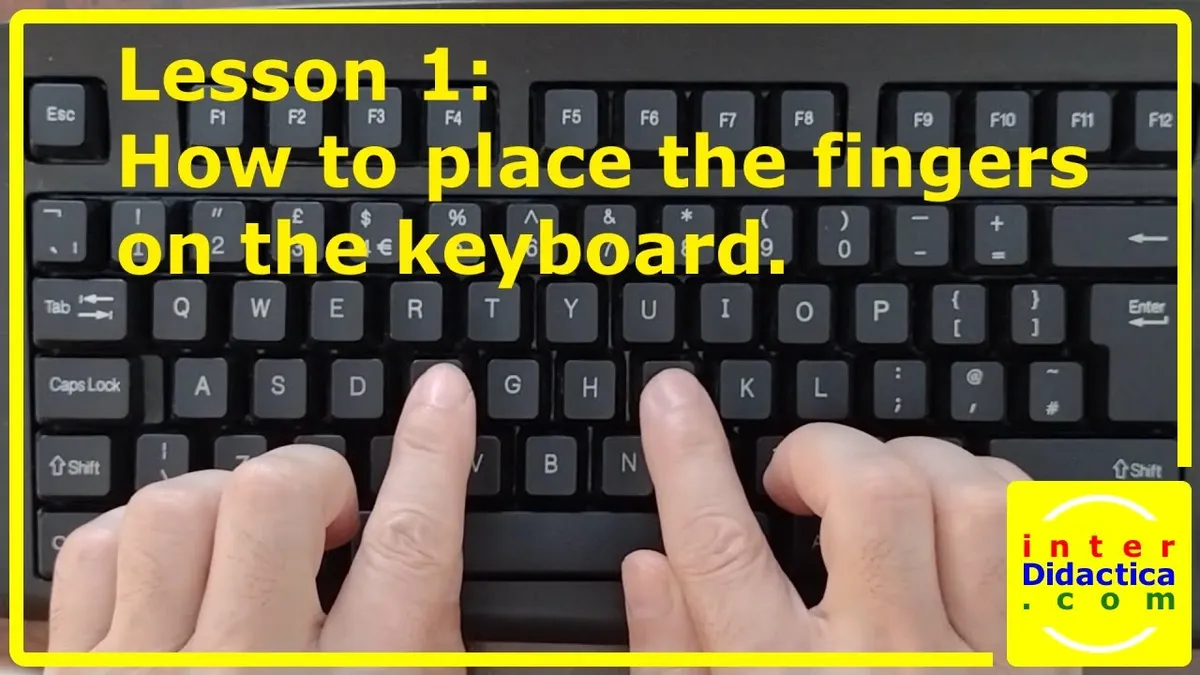
Lesson 1: Introduction and Posture
The first keyboard typing lesson focuses on proper setup and posture. You'll learn:
- Correct sitting position and desk arrangement
- Proper hand and wrist positioning
- Keyboard layout overview
- Introduction to touch typing concept
Lesson 2: Home Row Keys
Master the foundation of touch typing by learning home row keys (A, S, D, F, J, K, L, ;). This lesson includes:
- Finger assignment for each home row key
- Repetitive drills to build muscle memory
- Typing simple words using only home row keys
- Accuracy exercises to ensure proper technique
Lesson 3: Upper Row Keys
Expand your keyboard knowledge by learning upper row keys (Q, W, E, R, T, Y, U, I, O, P). Lessons include:
- Reaching techniques from home row to upper row
- Finger extension exercises
- Combined home and upper row typing
- Increased speed and accuracy challenges
Lesson 4: Lower Row Keys
Complete the letter keys by learning lower row keys (Z, X, C, V, B, N, M). This lesson covers:
- Lower row key positions and finger assignments
- Reaching from home row to lower row
- Typing with all three rows of letter keys
- Speed building with complete letter keyboard
Intermediate Typing Lessons
Lesson 5: Numbers and Symbols
Learn to type numbers and special characters efficiently:
- Number key positions and finger assignments
- Common symbols and their locations
- Shift key usage for uppercase and symbols
- Typing mixed text with letters, numbers, and symbols
Lesson 6: Punctuation and Capitalization
Master punctuation marks and proper capitalization:
- Period, comma, question mark, exclamation point
- Apostrophe, quotation marks, and other punctuation
- Shift key technique for capital letters
- Proper sentence structure while typing
Lesson 7: Speed Development
Focus on increasing typing speed while maintaining accuracy:
- Rhythm and flow development
- Anticipation typing techniques
- Reducing unnecessary hand movements
- Progressive speed challenges
Lesson 8: Accuracy Refinement
Perfect your accuracy and error correction:
- Common typing errors and how to avoid them
- Error detection and correction techniques
- Maintaining accuracy at higher speeds
- Accuracy-focused practice exercises
Advanced Typing Lessons
Lesson 9: Complex Text Typing
Type increasingly complex material:
- Technical and specialized vocabulary
- Long-form document typing
- Maintaining speed and accuracy with difficult content
- Professional typing standards
Lesson 10: Speed Mastery
Achieve professional-level typing speed:
- Advanced speed techniques
- Typing speed benchmarks and goals
- Specialized typing for different professions
- Continuous improvement strategies
Typing Lesson Structure and Format
| Lesson Component | Purpose | Duration |
|---|---|---|
| Introduction | Explain lesson objectives and key concepts | 2-3 minutes |
| Demonstration | Show proper technique and examples | 3-5 minutes |
| Practice Drills | Repetitive exercises to build muscle memory | 10-15 minutes |
| Application | Apply skills to real typing tasks | 5-10 minutes |
| Assessment | Test comprehension and skill mastery | 3-5 minutes |
Tips for Success with Typing Lessons
Follow the Sequence
Complete lessons in order. Each lesson builds on previous knowledge. Skipping lessons can create gaps that hinder progress.
Practice Consistently
Dedicate time to lessons daily. Consistent practice is more effective than occasional long sessions. Even 20-30 minutes daily produces better results than sporadic practice.
Master Each Lesson
Don't advance until you've mastered the current lesson. Aim for 95% accuracy before moving forward. This ensures a strong foundation for advanced skills.
Review Previous Lessons
Periodically review earlier lessons to reinforce fundamentals. This prevents skill degradation and strengthens muscle memory.
Track Your Progress
Monitor your performance metrics throughout the lesson series. Track WPM, accuracy, and improvement over time. Progress tracking provides motivation and identifies areas needing additional practice.
Typical Typing Lesson Timeline
| Timeframe | Lessons Completed | Expected WPM | Accuracy Target |
|---|---|---|---|
| Week 1 | Lessons 1-2 | 15-20 WPM | 90% |
| Week 2 | Lessons 3-4 | 25-30 WPM | 93% |
| Week 3 | Lessons 5-6 | 35-40 WPM | 95% |
| Week 4 | Lessons 7-8 | 45-55 WPM | 96% |
| Week 5-6 | Lessons 9-10 | 60-80 WPM | 97%+ |
Conclusion: Commit to Structured Learning
Keyboard typing lessons provide the roadmap to typing mastery. By following a structured curriculum, practicing consistently, and focusing on proper technique, you'll develop fast, accurate typing skills that serve you throughout your life. Start with the basics, progress methodically, and watch your typing abilities transform.